Showing posts with label How-to-do. Show all posts

Wednesday, November 21, 2012

Burn a CD on Windows XP Without Using Software


It's been a very long time since I wrote any posts about computer program or some of its tricks. Today I got this topic where I found it online, I sure find it handy sometimes and you can use it too, even if it's only to increase your computer knowledge.
Tips and Tricks
Windows XP comes with a builtin CD-copy feature that not many people are aware of. Although almost everyone has his/her favorite CD-copy software to stick with, it is still good to know about this CDR feature from Windows XP. You will find it very useful when you come to another PC that doesn't have a CD-copy software, and you can't just install your favorite software to it. With this feature, you can write some data or MP3 files to a CD/DVD, or erase a re-writable CD/DVD. 

If you're using a Re-Writable CD (CD-RW), make sure the disc is blank. 
You might need to erase (or "format") it before use.

Requirements: You need to enable the CD-R feature on Windows XP.

Thursday, August 2, 2012

How to Make a Blog Fast and Faster


I believe this is one of the things every blogger wants for their blog ...

Make Blog Faster
Who doesn't want their blog become light, surely all of bloggers want it because our visitors can browse our blog easier. Based on my experience, there are some tricks to make blog fast.

Saturday, June 2, 2012

Animated Sassy Social Bookmark Gadget


I know there have been many ReBlog posts lately but all of them are worth the share, they are very inspiring and that's what I look for in this blog and here's another How-to-do with tips for social media shares on blogs.

Animated Sassy Bookmarks Widget For Blogger BlogsI know how much you all like social bookmarking gadgets and widgets especially unique gadgets that can catch the eye of readers and get them bookmarking your blog. Today I have a very cool social bookmarking gadget with a stylish animated effect. With the Sassy bookmarks gadget a basic share button is placed in the corner of your blog, then on hover 6 icons for the main social bookmarking websites appear in a semicircle. The buttons that appear are for Pinterest, Google+, Facebook, Twitter, Tumblr and Email. Below we have a live demo then check out the tutorial to add the Sassy Bookmarks to Blogger.

View Demo Button

Add The Animated Sassy Bookmarking Gadget To Your Blog
Remember Always Back Up Your Template Before You Make Changes


Sunday, March 25, 2012

An Awesome Heart Bookmarking Gadget


As you guys already know I use Addthis sharing on social media tool. I also shared a reblog post of another sharing gadget with jQuery which you can find from here [link]. I found another interesting sharing post which you will definitely like, it's new, creative and totally awesome. Give your blog a touch of style B)
Blogger Bookmarking Gadget 
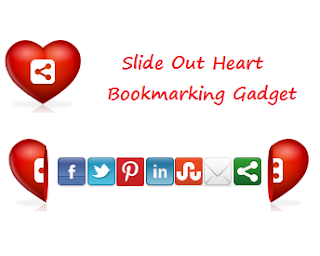
In this post I want to show you a cool new way to have visitors sharing your blog posts. Share This has always been my Bookmark tool of choice and recently they added a cool new interactive Bookmarking gadget. The gadget in question is a love heart with the share this logo and on hover the heart splits to reveal a selection of bookmarking buttons. It looks awesome and the slide effect is very cool while still being practical. When the heart opens it reveals icons for Facebook, Twitter, Pinterest, LinkedIn, Stumble Upon, Email and the Share This Icon Offers hundreds more bookmarking choices. I think this gadget fixed in the corner of the page on your blog will grab the attention of visitors and generate lots more shares. So below is a tutorial showing you just how to do that, first check out the live demo.

View Demo Button

Add The Split Heart Bookmarking Gadget Top Your Blog


Saturday, February 18, 2012

Auto Publish Your Blog Posts


When running a blog it is an important element to keep it up to date like posting twice or more per week as mentioned in the Tips for Writing Good Blog post. You can write you topics in advance and get to your dashboard to post them on time. Though this is a good way, you can also try the auto-publishing feature in blogger that allows your posts be published according to a certain date you fix. This way you get more time to do  other stuff then coming here every time for posting your blog. 
 
 Auto-publishing blog post is known as scheduled posts in blogger and it's as simple as: 

Tuesday, February 7, 2012

Cool Shareaholic jQuery Slide Bookmarking Gadget


As you guys know I use Addthis widget in my blog for sharing on social media. But I know this really wonderful tool of sharing that like pops up when you point at them. Today, I have a ReBlog post for how to get that sharing button in your blog. 

Add The jQuery Slide Bookmarking Gadget To Your Blog
https://blogger.googleusercontent.com/img/b/R29vZ2xl/AVvXsEg4ymFoB5L9YRwyXiax8ptfo1No07J2Iks4Fn_GrHYOy5SSP5ZsFtSM_CrKuQqdfINMkRnC6MLfxkjW6FBmV7DMGmATUdelZutCLJFUWxjD8e3Er_AwVwdH8sjeVefjVRaM8k9C7H_h3JA/s1600/pop-up-social-bookmarking-gadget-for-blogger.PNG
 Remember Always Back Up Your Template Before You Make Changes. 

Sunday, January 22, 2012

Getting Traffic to Your Blog


One of the things that matters you as a blogger is the audience or reader to it. Without them you are just writing a journal of your own. Thus, you have to attract to right people for the topics you write so they will interact with you positively.

Here are simple 5 methods to get readers (traffic) to your blog that you might use everyday. 

Saturday, January 14, 2012

How to Make the (Show Desktop) Icon


One of the icons in the task bar is the (show desktop) icon which enable to view the whole desktop when clicking on it. It's very useful when you have a lot of programs opened then you want to jump to a file, folder or any other item on the desktop. Also, if you are one of those who care about privacy much and on a shared computer to hide all your stuff and whatever you are working on once anybody comes into your room. 
http://icons.iconarchive.com/icons/tpdkdesign.net/refresh-cl/128/System-Desktop-icon.png
Accidents might happen and you can delete that icon by mistake. It's not a shortcut that you can replace back easily. Today's post I'll show you how to make this icon in case you deleted it by mistake, it disappear or just to know how =)

So, let's get started!

Friday, January 13, 2012

Tips for Kanji: On & Kun Reading


This blog is not about languages nor about Japanese but it IS about the experience I gained in different fields and Kanji happens to be one of them. So today I'll share my method in learning how to know the Kun from the On reading.

The most interesting thing about Japanese is Kanji. It's fun and difficult in the same thing. Learning the writing system is unique and none like other. It's not just letters and alphabets, it's specific drawings that have certain meaning that what makes it interesting.


Before starting with it, one needs a lot of tips and info about Kanji in general. I read many useful ones and figured out a method of my own. But first there's one important note, at the beginning it seems a real hard thing and as many believe it takes a long time to finish though it's true that it takes some time to learn almost an amount that makes you able to read Japanese but it's not a long time, depending on how much you study every day.


Here's a simple way I followed in learning kanji:

Sunday, January 8, 2012

How to Control Short Temper


Being a short tempered person can cause you troubles on your health and relationships. Controlling such temper could be a challenge at some points. Whenever you find yourself firing up if a guys talked with you in a rude way or your friend forget to get you your stuff or even if your whole day went bad, you could consider these steps to tame your temper. 

 
1. Counting to 10
Yeah! We said this a lot of times to kids and saw it in movies and shows and in fact this method is really helpful and powerful. Taking a deep breath and counting to ten lets your mind to take a break from what happened and think it all over again. 

2. Change Position 
If you are standing sit down. If you are sitting lay down. Change your body satiation from a condition to another will allow the body to clam down. 

3. Think before you speak
When the anger is all over you, you'll say things you don't mean and regret for it later. So don't make this mistake and take a little bit of time before replying back. 

4. Take a break 
If someone made you mad just stop the conversation for a while and take a break. Eat a light snack, walk in the garden, watch a short video clip. Just allow your mind to free the stress then talk again with clear mind. 

5. Wash your face 
When you're mad it's like getting FIRED with anger. Splash your face with water to (cool) that (fire) then you'll feel you're are losing your anger slowly slowly. 

Friday, December 30, 2011

Lock Your Folder For Privacy


When it comes to using internet or shared PC, considering privacy is very important. While some using different accounts on the same computer, there are times when you need to lock your files and documents in a folder for privacy sake. 

http://icons.iconarchive.com/icons/mattahan/umicons/128/Folder-Locked-Folder-icon.png 
Some could have winzip or winrar in their mind. That's okay, but it's always good to learn new tricks about your computer and specially those that doesn't require any program for your purposes. 


So today, I'll show you how to lock your folder without any program. 

Friday, December 23, 2011

Ideas X Ideas


When you want to make a new project, whether it's for your job, school, university, family member, your own self or anything else you need new and unique ideas for it. 

You want your project to be cool and none like other. Thus, you go to a journey on finding what's best. A great chain of good ideas is not a bad thing. Today, I'm going to tell you a few ways on how to get inspired with ideas and improve them to the best. 

Ideas X Ideas 

Monday, December 5, 2011

Create a Facebook Style Fan Page on Google Plus


Google Plus has been live online since the end of June 2011, while it started growing at the speed of a runaway train questions are being asked as to it's future. 

http://icons.iconarchive.com/icons/spaksu/google-plus/128/Google-Plus-1-icon.png

Recently, however, Google have added a Google Plus Pages option for business, bands and products. Google Plus Pages are not just like Facebook Pages, they have almost the exact same format. So for us Bloggers, we can as on Facebook create a page for our blog on Google Plus. Creating the page is quick and easy and in this post I will walk you through the steps.

  https://blogger.googleusercontent.com/img/b/R29vZ2xl/AVvXsEjkiGqcdaPlMGMKDZjvvXc3ORV89O67fQX2QAyGM5aEehlhYERsk3TXuuRpopklvu-o-Zc2lwfRyzIFDGEvVywpaGGcArdS_0ogXgTlvMlGAPb6XzXjgLpbje0pD3PKAVX6rtPWoraqFTU_/s200/Google-Plus-Logo.png

Create A Google Plus Fan Page For Your Blog

Friday, December 2, 2011

[Blogger] Hiding Linkwithin Widget from Home Page


In my previous post I talked about an important widget for every site that is the sharing button. I mentioned that AddThis is the most popular one and how to fix the common problem of hiding it from your Blogger home page.

Today, I'm going to talk about another widget which is the related posts one. I know there are a lot of this weight online but the one I'm gonna talk about here is the Linkwithin

 https://blogger.googleusercontent.com/img/b/R29vZ2xl/AVvXsEjM9LR8xmWEC-c15Lnu_nHHoi7qyX4K4lrr8YZ91f6GL0VbCFmMMGPrGr-nL8X-CoETukxzn8GB-EO-GTz-vIK1S6PAZ7A06WHyV8-QeDotvYVeBNnSAXTV5hnU52pk8lFC4RXe3xQ9gSE/s1600/link-wihin.jpg

It's a very handy one only the problem is – like the sharing button – it shows on the home page when you just want it to be in the post.

The trick is simple just follow these steps

[Blogger] Hiding the Share Button from Home Page


One of the important widgets that every blog has is the sharing button.

Of course there are a lot online but AddThis is the well-know one between them all. You can find it at almost every blog; even some sites use it such as livemocha.
 
Adding this widget to your blog is simple. Just go to the site and follow the guide. However, there's a common problem about it that is how it shows on the home page while you want it to be only in the posts alone.

And in this post I'll show you how to do that; just follow these simple steps

Tuesday, November 29, 2011

Tips for Writing Good Blog


Probably one of the things every blogger thinks about is how to write a good piece of post that will attract the readers and make them royal visitors to their blogs.

If you look at some blogs online you can notice how each one of them differs from the other. Some are really interesting others are okay while special ones can't really stop you from reading. But the common thing about them is the information they give has the same value.

As a blogger you should always write a good posts cause that's what really matters. 
Here are some tips that will help you:

Sunday, July 17, 2011

Animated Label with jQuery


I saw this wondering trick on one of my followers blog. Thought I might share it with you guys since it's really cool and adds a special touch to your blog B) you'll love it for sure ;)


Did you know, jQuery Link Nudging? Now we will add jQuery Link Nudging in Label. What is the effect? So, when you put your cursor on one of the label, the label will be move to the right. Now, if you wanna try Animated Label with jQuery, just follow the steps below.

Wednesday, July 6, 2011

Pictures Privacy


http://icons.iconarchive.com/icons/icondesigner.net/hyperion/128/Secure-icon.pngI mentioned before in one of my earliest post about privacy in the interest. That doesn't limit just there. Privacy is also applied else where like your personal stuff in cells phones, memories, iPhones or any other storage drives.

As you already know, pictures are one of those stuff that people give special privacy to. You don't usually put out all of your photos online or upload them all to facebook! Some are private and only can be seen by friends and family. Maybe just for yourself!

http://icons.iconarchive.com/icons/robsonbillponte/sinem/128/File-Picture-icon.pngAt times when you need to do a little format to your PC or take it to the store to fix it, you surly delete your photos after saving them elsewhere. However, we know that there are programs that allow you to recover files even when they are deleted. Like using iCare Recovery.

Therefore, you need to do something about it. That even when it's recovered from deleting the picture will be empty and won't be any use for anyone.

Follow these steps for insecure  privacy to your pictures and photos:

Monday, July 4, 2011

How to Show (Enable) Japanese Characters on PC


Sometimes when you go to an Asian site page (e.g. Japanese, Chinese) you see squares instead of characters. Those are the Asian scripts that don't appear to you cause the language itself isn't installed in your computer. 

Today, I'm going to show you how to install the Japanese language which will enable you to see those characters when visiting a Japanese or Chinese site as well as writing the script itself.

Okay, let's get started!

Thursday, June 9, 2011

Add a Favicon to Your Blog (Blogger)


For many bloggers, having a custom favicon (the tiny image displayed in your browser’s window or tab) is the finishing touch that ties together the design and identity of a great looking blog. Today, Blogger in Draft users can now add a customized favicon to their blog.